
Filtering and Grouping Artworks
The Artworks page shows your collection. Below the completion chart, the control row shows how many artworks match your current filters and lets you filter, group, or change the list view.
Use the search field to find artworks by name, description, materials, dimensions, frame, inventory number, or location. Search works together with the filters below.
Filtering artworks
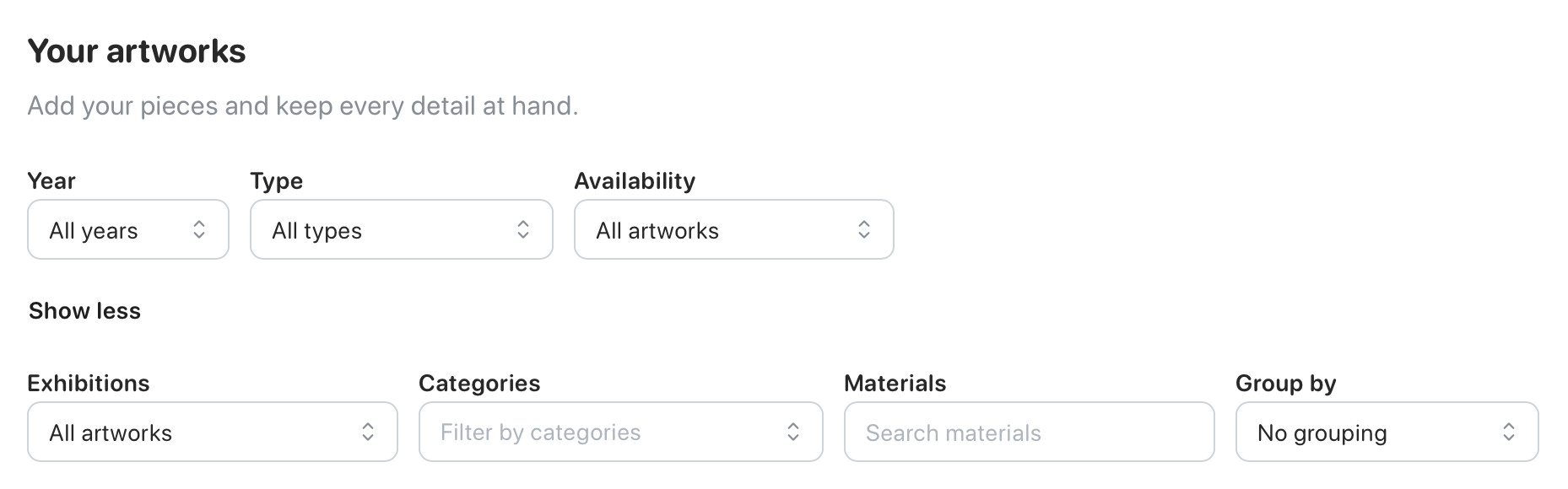
Section titled “Filtering artworks”Select Filter to open the filter menu. You can filter by:
- year
- type: original, limited edition, or open edition
- availability: available, available between dates, or sold
- exhibitions
- categories
- materials
When you choose Available between, date fields appear so you can set the date range. Edition type is an artwork-level filter. To find a particular numbered or special limited-edition copy, open the artwork and use its Edition tab.
When filters are active, the control row shows a pill for each selected filter. Select the close button on a pill to remove that filter, or choose Clear all to remove all filters, including a month selected from the chart.
If the completion chart is visible, select a bar to show artworks completed in that month. The selected month appears with the other active filters and can be cleared from its pill.
Grouping artworks
Section titled “Grouping artworks”Select the Group control to split matching artworks into sections. It shows the current grouping; Group: None means the list is not grouped.
Grouping options include:
- state
- location
- current exhibition
- collector
Each group keeps the selected grid or table view.
Choosing a grid or table
Section titled “Choosing a grid or table”Use the view buttons in the control row to switch between a grid of artwork cards and a table. The table shows an image, name, status, date, inventory ID, and artwork type. Artlope saves your view choice for your account.